


Regal: Tickets and Showtimes
3.013.78K Reviews
App Specs
- Version
- 11.20.0
- Updated On
- License
- Free
- Downloads
- 5,000,000+
- Developer
- Regal Cinemas
- Categories
- Entertainment
- Platform
- Android, iOS
Screenshots


 Analysis by AppCompare
I usually open a cinema app when I have a movie in mind but still need to turn that idea into a workable plan: find a nearby theater, choose a time, coordinate seats, and get everyone through the door without a last-minute scramble. Regal’s app is built around that practical trip from browsing to booking. It is free entertainment software from Regal Cinemas, and I find it most useful when Regal is already the theater I expect to visit.
Start with the theater, not just the movie
When plans are still loose, I’d begin by checking which Regal locations are convenient before settling on a screening. A title may have several times, but the best choice depends on the whole evening: travel, dinner, who is coming, and whether a later show would make getting home awkward. Thinking through those details first makes the app more useful than simply picking the earliest available time.
The app is aimed at movie discovery and ticketing, rather than serving as a general guide to every cinema chain. That focus is a strength if Regal is where you go, but it also sets a clear limit: if your preferred theater belongs to another company, you will probably get more value from that chain’s own app or a broader showtime service. I would not install this expecting one place to manage every cinema outing.
From browsing to a confirmed plan
Once I have a location and a rough time window in mind, the useful part is narrowing the choices. Comparing showtimes before committing helps avoid the familiar mistake of choosing a screening that looks convenient on its own but does not fit the group’s schedule. If you are deciding between formats, checking the screening details before moving on is also worthwhile; the point is to select the experience you actually want, not just the first time that appears.
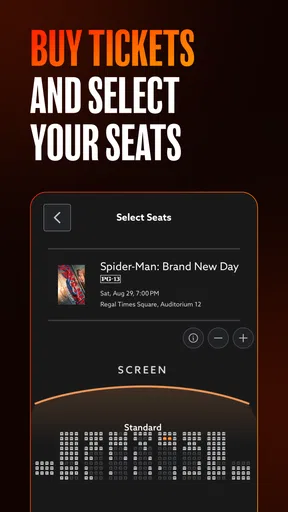
Seat selection is an important handoff between browsing and booking. For a group, I would settle on the number of people and agree on the time before choosing seats, since changing one decision late in the process can mean starting the selection again. For a solo visit or a flexible pair, there is less coordination and the app’s ticket flow is easier to use as a quick decision tool.
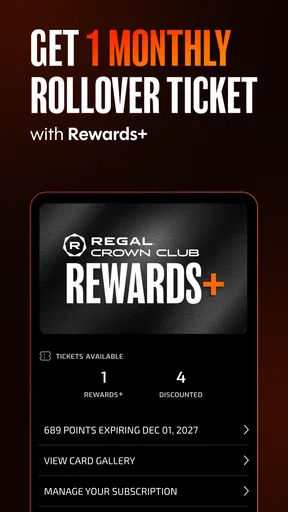
Rewards can make the booking step more meaningful for regular customers. Regal Crown Club members can use the app to keep track of points and rewards, so it is worth signing in before a purchase rather than treating membership as something to sort out after the visit. I see that as a practical habit: checking the account while planning gives you a chance to consider whether a reward changes which visit makes sense, instead of overlooking it at checkout.
What happens between checkout and showtime
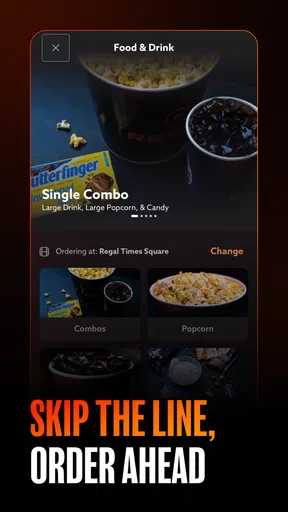
A ticket purchase is only one part of a cinema visit. If you plan to order concessions through the app, that can change how you time your arrival and how you handle the queue. I would decide what I want before reaching the theater, especially when meeting friends or bringing children, because fewer decisions at the counter can make a busy arrival feel less rushed. The trade-off is that preordering only helps if it fits the way that particular visit unfolds; it is not a reason to cut arrival time too close.
Worth Reading Before You Choose

EA SPORTS FC Mobile 26 Is a Bigger Football Game, but It Takes Time

Flipboard Shows What News Apps Must Do Beyond the Feed

Switching to Android Auto Means Rethinking Your Driving Routine

Google Calendar Makes a Crowded Week Easier to Manage

Ludo King Makes the Most of the Minutes Between Plans

Baby Panda World Brings Quick Play to Modern Phones, but Its Game Library Feels Busy
For a group outing, I would share the practical details as soon as the plan is settled: the theater, the screening time, and where everyone needs to meet. The app helps with the booking itself, but it cannot make late friends, travel delays, or different preferences disappear. Sending the key information early is a small step that prevents the ticket holder from becoming the group’s only source of updates just as the movie is about to start.
Regal’s app is also a different kind of tool from a streaming service. It helps arrange an in-person cinema trip; it does not replace watching at home when convenience, cost, or a flexible schedule matters more. I would choose it when a specific theatrical experience is the point, and choose home viewing or another cinema option when the location or timing makes a theater visit impractical.
Getting to Know Regal
First off, let’s talk about the basics. The Regal: Tickets and Showtimes app is available on both Android and iOS, and it’s a breeze to install. Once you’re in, you’re greeted with a sleek and user-friendly interface that’s pretty intuitive. The app’s main focus is to make your movie-going experience as smooth as possible, and I must say, it does a pretty good job.
Features That Stand Out
One of the standout features is the ability to easily find showtimes and purchase tickets. The app syncs with your location to show the nearest Regal theaters, which is super handy when you’re out and about. You can filter by movie, time, or even by the type of screening (think IMAX, 3D, etc.).
Another cool feature is the integration with the Regal Crown Club. If you’re a member, you can log in to track your points, redeem rewards, and even get exclusive offers. It’s like having a VIP pass in your pocket!
And for those who like to plan ahead, the app lets you pre-order snacks so they’re ready when you arrive. No more waiting in those long concession lines—which, let’s be honest, is a game-changer when you’re running late for a show.
The User Experience
Using the app feels seamless, and that’s partly because of its clean design. The navigation is straightforward, with everything you need just a tap away. I found the ticket purchasing process especially smooth. It’s as simple as selecting a movie, choosing a time, picking your seats, and checking out. The app saves your payment details securely, making future purchases a breeze.
Notifications are another feature I’ve come to appreciate. The app sends reminders for upcoming shows and even notifies you of special promotions or new releases. It’s like having a personal movie assistant.
What's Missing?
While the app is pretty comprehensive, there are a few areas where it could step up. For one, I’d love to see more personalized recommendations. While it does suggest popular movies, having a tailored list based on my viewing history would be fantastic.
Also, while the app offers a lot of information, sometimes it can feel a bit overwhelming. A more simplified home screen with quick access to frequently used features could enhance the user experience.
Making the choice fit your evening
One everyday situation where I’d reach for it is a spontaneous weeknight plan. I can check whether a suitable movie is playing at a Regal nearby, compare a couple of times, and decide whether the trip fits around work and dinner. If I am meeting someone, I would confirm the location and time with them before buying; agreeing first reduces the chance of having to reorganize seats or abandon a booking because our schedules do not match.
For a family outing, the decision process is a little different. I would check the film and screening details together, then choose a time that leaves enough breathing room for getting there and settling in. Concessions may be convenient to plan through the app, but I would not assume that preordering eliminates every line or guarantees a stress-free arrival. The sensible approach is to treat it as one planning option, not a substitute for allowing time at the theater.
The app is most appealing to people who return to Regal, want to book directly, or value keeping ticket planning and Crown Club activity in one place. Occasional moviegoers can still use it to choose a show and buy a ticket, but they may not care about the rewards side enough to make it a regular part of their phone. If you usually compare several theater chains before deciding, a broader listings option may be a better first stop; once you choose Regal, this app is the more focused path to a booking there.
There are a few useful checks I would make before tapping through checkout. First, verify the theater location rather than relying only on a familiar movie title; the same film can be a poor choice if the selected Regal is inconvenient. Second, check the screening format and time together, because a preferred format is not useful if its schedule does not work for the group. Third, if rewards matter to you, sign in early enough to review your account during planning. These small checks help prevent avoidable changes after seats have been selected.
It is also worth thinking about the person who is handling the booking. If one friend buys every ticket, they should make sure the rest of the group has agreed on the screening and seat arrangement before paying. If each person is buying separately, everyone should coordinate promptly so that the group does not end up scattered. The app can make the transaction straightforward, but the social handoff still depends on clear communication.
Where the smooth flow can become less smooth
The biggest practical limitation is that a polished booking flow cannot solve a mismatch between the app and your plans. A nearby Regal may not be the theater you want, a listed time may not suit everyone, or a group may need more discussion than a quick purchase allows. In those cases, I would pause rather than buy tickets simply because the checkout feels easy. Comparing alternatives first is better than discovering after payment that another location or a different kind of evening would have worked better.
There is also a difference between convenience and control. Using one app for showtimes, tickets, rewards, and snacks can reduce the number of separate steps, but it means the experience is centered on Regal. Someone who prioritizes comparing theaters, keeping all plans in a general calendar, or choosing the cheapest outing may prefer to start elsewhere and use Regal only once the decision is made. That is not a flaw so much as a trade-off in choosing a chain-specific tool.
The app’s popularity is substantial, although public feedback is mixed: it has a 3.0 average from around 47,000 ratings, alongside roughly 14,000 written reviews. I take that as a reason to keep expectations practical rather than assuming every booking will feel perfect on every device and occasion. Regal has more than 5 million installs, but scale does not remove the need to double-check the details that matter to your own visit.
As an app in the entertainment category, Regal is free to install and is rated Teen. It was released in 2012, and version 11.20.0 is the current version. Those details are less important to me than whether the booking flow suits my habits, but the Teen rating is useful for households deciding whether the app is appropriate for a younger movie fan to use independently.
My Final Thoughts
Overall, the Regal: Tickets and Showtimes app is a must-have for any movie enthusiast. It’s a powerful tool that simplifies the process of finding, booking, and enjoying movies. Whether you’re an occasional movie-goer or a cinema aficionado, this app has something for everyone.
So, if you haven’t already, give it a shot. It might just become your go-to app for all things movies. And who knows, you might even start visiting the theater more often!
My more measured recommendation is to use it when you already expect to visit a Regal and want to handle the practical details in one place. It is especially handy for checking a local screening, arranging seats, and keeping rewards in view; it is less compelling if you mainly visit other chains or prefer to compare every option before choosing. Regal Cinemas has built a focused companion for its own moviegoing experience, and for the right routine, that focus is exactly what makes it useful.
Pros
- User-friendly interface for easy navigation.
- Quick ticket purchasing process.
- Detailed movie information and trailers.
- Reliable seat selection feature.
- Frequent updates with new features.
Cons
- Occasional app crashes reported.
- Requires stable internet connection.
- Limited payment options available.
- Some users experience slow load times.
- Location services must be enabled.
FAQs for Regal: Tickets and Showtimes
What features does the Regal app offer?
The Regal app provides a comprehensive movie-going experience, offering features such as easy ticket purchasing, access to showtimes, seat selection, and notifications for new releases. Users can also manage their Regal Crown Club account, earning points for rewards like free movies and concessions. The app includes a location-based theater finder for convenience.
How do I purchase tickets through the Regal app?
Purchasing tickets via the Regal app is straightforward. After selecting your preferred movie and showtime, you can choose your seats and proceed to the payment section. The app accepts various payment methods, including credit cards and digital wallets. Once purchased, your tickets are stored within the app for easy access at the theater.
Is the Regal Crown Club membership integrated into the app?
Yes, the Regal Crown Club membership is fully integrated into the app. Members can track their points, access exclusive offers, and redeem rewards directly through the app. This integration ensures that all your movie-going activities are streamlined, making it easier to enjoy perks like discounted tickets and concession deals.
Can I use the Regal app to find nearby theaters?
Absolutely. The Regal app includes a location-based feature that allows users to find nearby theaters quickly. By enabling location services, the app can show you the closest Regal cinemas along with their available showtimes. This feature is particularly useful for travelers or those in unfamiliar areas.
What should I do if I encounter issues with the app?
If you experience any issues with the Regal app, there are several steps you can take. First, ensure that your app is up to date, as updates often fix bugs. If problems persist, try restarting your device or reinstalling the app. For further assistance, the app provides customer support contact details for more personalized help.


